AWL Internet Speed Test & Submission Form – Contact Center
To move forward in the hiring process, we need to verify that your internet connection meets the speed requirements for the role you are applying for with AWL.
Please complete the speed test on this page using a wired Ethernet connection, then click the Share button after the test finishes. Your results link should automatically populate in the submission form below.
Once your information and speed test results are submitted, our hiring team will review everything and follow up if anything else is needed.
Before you start, please confirm:
- ✅ You are connected to your router/modem using an Ethernet cable (hardwired).
- ✅ You are not using Wi-Fi, mobile hotspot, VPN, or incognito browser window.
- ✅ No one else on your network is actively streaming, gaming, or downloading large files during the test.
If you are not hardwired: connect your Ethernet cable from your computer to the router first, then run the speed test before submitting your results.
Step 1: Run Your Speed Test
- Plug your computer directly into your modem/router using an Ethernet cable
- Turn OFF Wi-Fi and VPN
- Close all other applications
- Click below to run the test
- Click the Share Button once it completes
Step 2: Submit Your Results
- After your speed test finishes, click the Share button in the widget above
- Please wait for the form to submit and process – a green SUCCESS notification message will appear below the form once your information is succesfully saved and sent over to the AWL hiring team.
Submit Your Information & Speed Test Results
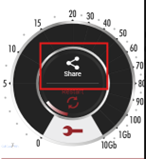
Complete the form below AFTER your speed test has finished and you have clicked the Share button within the widget above.
Your speed test results link should automatically populate in the Speed Test Results Link field below once test is succesfully completed. -> A visual example of the Share button that you should see appear once finished can be seen on the right.
Double Check: Make sure you are not using a VPN, incognito browser window, or mobile hotspot, as it can effect real-time internet speed results etc..
If the results link does not auto-fill once the share button is clicked, please reload the page while still connected to your ethernet wire and re-run the test. It should auto-capture the correct URL and place it in the submission field below automatically – as soon as the “Share” button is clicked.
Please email us if you run into any technical issues or have questions.
Please make sure all details are entered accurately. Select Yes below only if you were hardwired with Ethernet during the test.
Thank you for submitting your information – The AWL Team will be in contact with any follow up communications as we process results. Once verified that you successfully completed and submitted the form above – You are free to exit the page & we will be in touch upon processing.
Minimum Requirements:
✔ Download Speed: 50 Mbps or higher
✔ Upload Speed: 10 Mbps or higher
✔ Must be consistent and stable connection
Tests completed on Wi-Fi or mobile devices will NOT be accepted.
Having Issues?
- Restart your modem/router
- Try a different Ethernet cable
- Close all apps and rerun test
Avoid These Common Mistakes
❌ Using Wi-Fi instead of Ethernet
❌ Submitting old or cropped screenshots
❌ Missing date/time in screenshot
❌ Running test on phone or tablet
❌ VPN turned on